> For the complete documentation index, see [llms.txt](https://help.cymmetri.io/llms.txt). Markdown versions of documentation pages are available by appending `.md` to page URLs; this page is available as [Markdown](https://help.cymmetri.io/governance/compliance-management/iga-policy-violations.md).

# IGA Policy Violations

## Overview

This manual outlines the administration process for managing and handling policy violations within the Cymmetri Identity Governance and Administration (IGA) system. The system provides features such as maintaining a Library of Default Policy Violations, policy simulation, scheduled violation reporting, and autocorrection mechanisms. These features help ensure compliance, mitigate security risks, and maintain proper access control across the organization.

## Functional Features

### Library of Default Violations

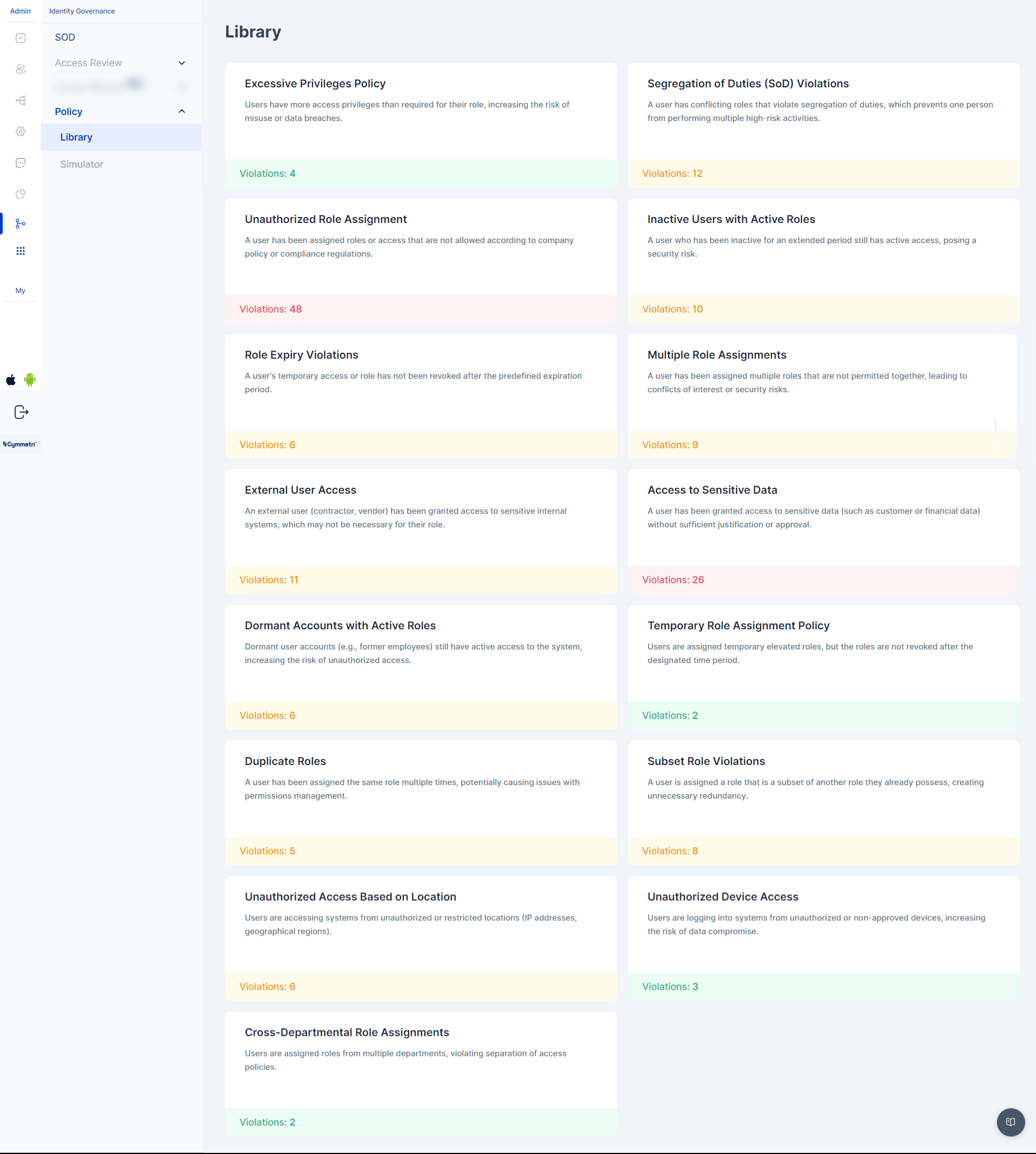
The IGA system maintains a centralized Library of Default Violations, which includes predefined policy violations. These violations are categorized based on typical governance issues, such as excessive access, unauthorized role assignments, or segregation of duties (SoD) violations.

How to Access and Manage the Library

1. Navigate to the Policy Violations Library under the Governance section.
2. Review the list of predefined violations (e.g., Excessive Privileges, Segregation of Duties, Unauthorized Role Assignment).
3. View detailed descriptions of each violation type, including risk levels, sample records, and suggested remediation actions.

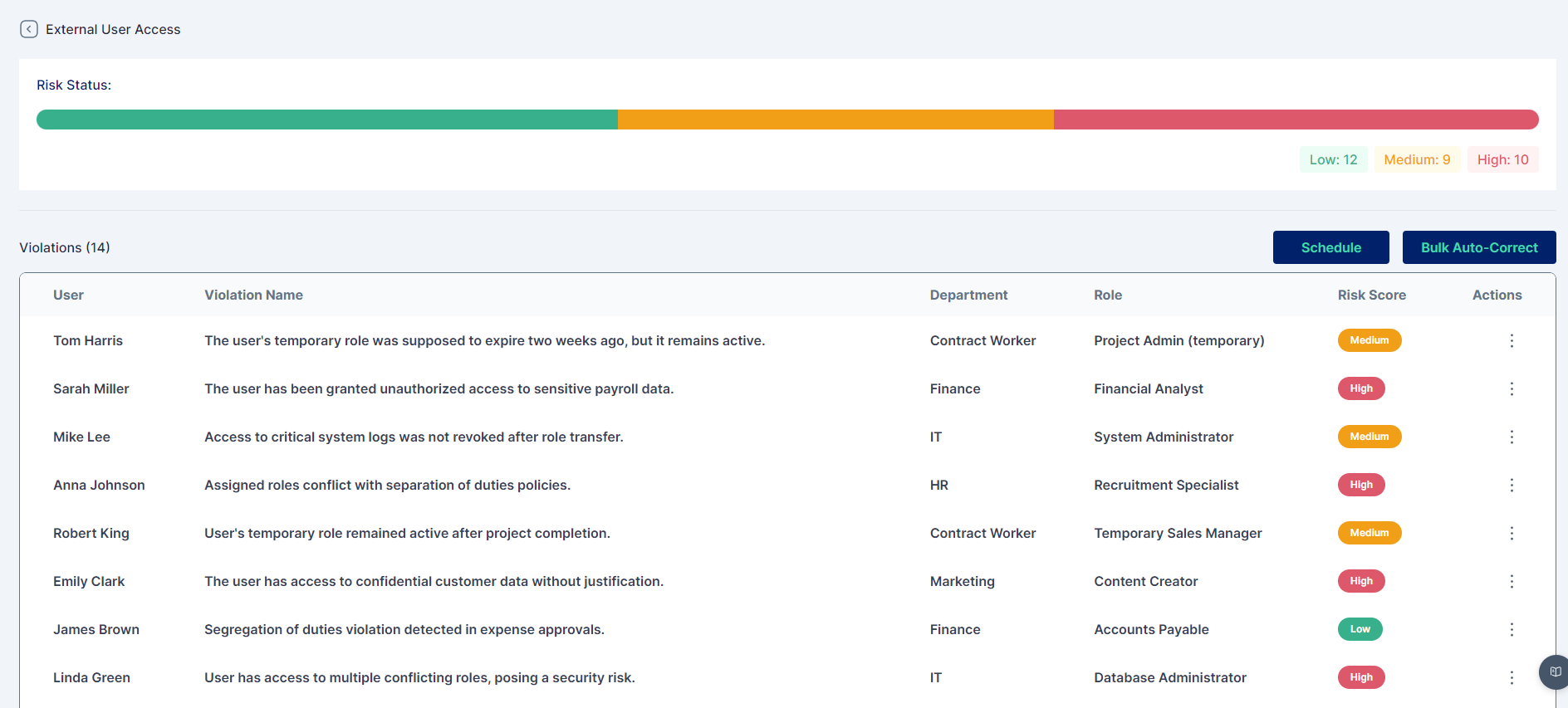
<figure><img src="/files/m0A2VTIRK50QMyFNpWHu" alt=""><figcaption><p>Artefact - Cymmetri Policy Library - IGA</p></figcaption></figure>

Administrator Actions

* View or export reports detailing current violations.
* Modify or update violation definitions based on changes in business requirements.
* Add new policy violations to the library, if necessary (refer[ ](#designing-new-policy-violations-through-simulation)[Designing Policy Violations ](#designing-new-policy-violations-through-simulation) for custom violations).

<figure><img src="/files/qjdkwGNgIHwH25EBDXz3" alt=""><figcaption><p>Artefact - Cymmetri Policy Violations View</p></figcaption></figure>

### Designing New Policy Violations through Simulation

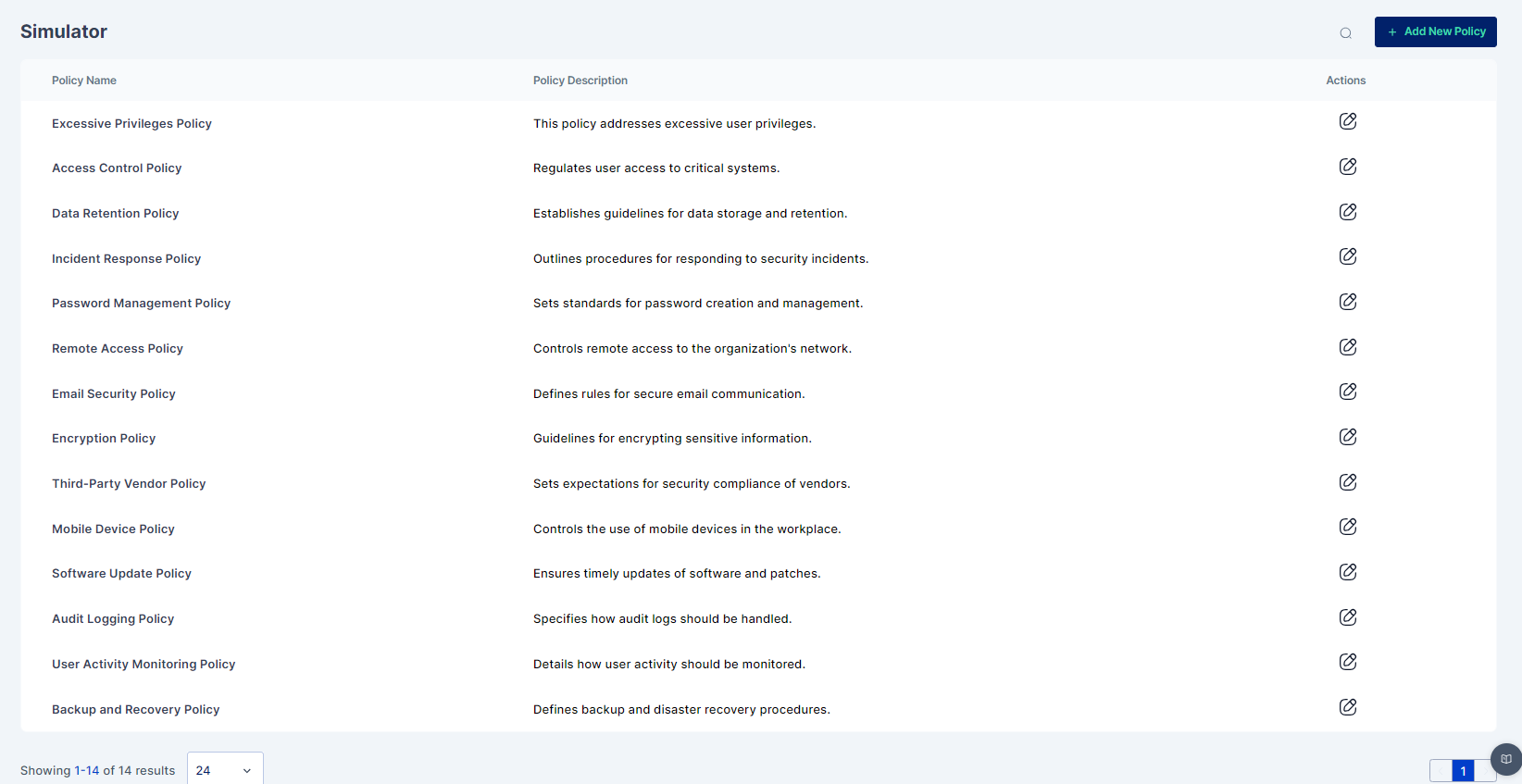
The system allows administrators to design custom policy violations using the built-in Policy Simulator. This feature helps assess potential risks before applying new policies system-wide.

Steps to Design a New Policy

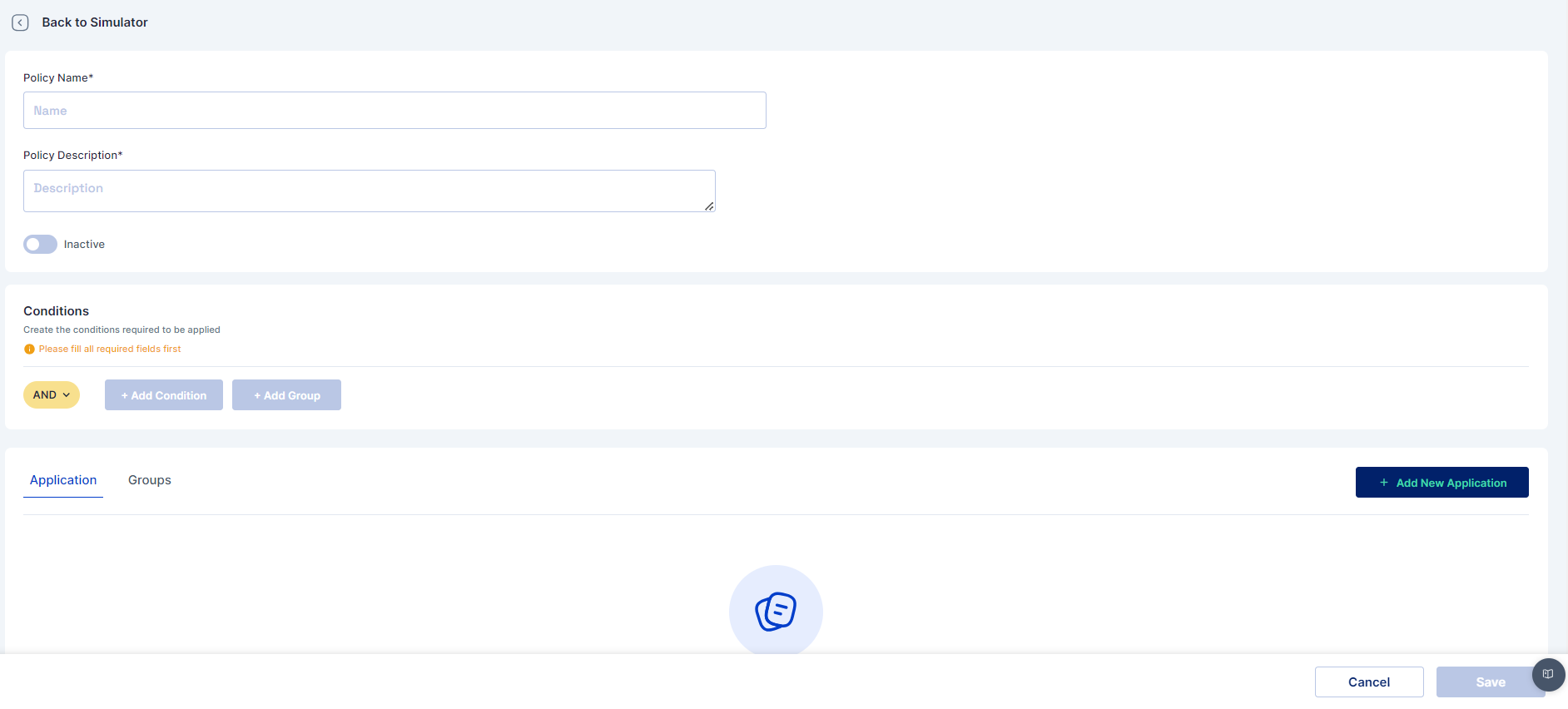
1. **Access the Policy Simulator** Navigate to the Policy Simulation section and click on Create New Policy.
2. **Define Policy Conditions** Provide a unique name, description, and select the target population. Define conditions like roles, data access, and compliance rules.
3. **Assign Violation Severity** Select a Severity Level (Low, Medium, High, Critical).
4. **Simulate the Policy** Click Simulate to apply the policy to the current system configuration and view results.
5. **Modify and Re-Simulate** Modify conditions and rerun the simulation if necessary.
6. **Save and Enforce** Save the policy to the Library of Default Violations and enforce it across the organization.

<figure><img src="/files/jc7Xw33ayfqTeq8P4QE6" alt=""><figcaption><p>Artefact - Cymmetri Policy Simulator</p></figcaption></figure>

<figure><img src="/files/LO6kDJygOQTOVIqHFvP0" alt=""><figcaption><p>Artefact - Creating New Policy </p></figcaption></figure>

### Scheduled Violation Reporting

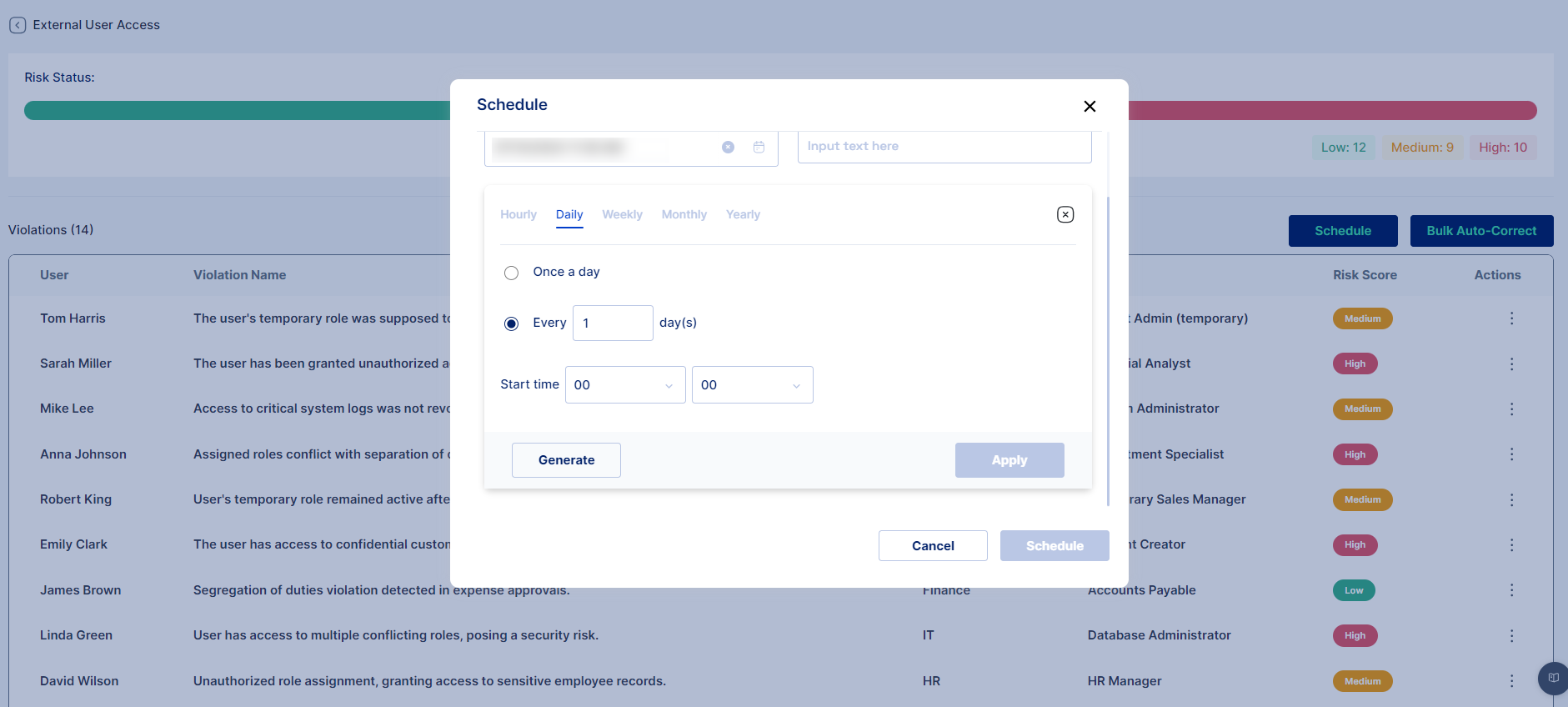
Administrators can schedule regular reports to monitor policy violations across the organization. These reports provide detailed information on violations, risk levels, and affected users.

Steps to Schedule Reports

1. Navigate to the Scheduled Reports section under Governance.
2. Select the Create New Report option.
3. Choose the Violation Types and Risk Levels to include (e.g., Excessive Privileges, High-risk violations).
4. Set the report frequency (e.g., daily, weekly, monthly).
5. Define Email Recipients for the report (e.g., <security@company.com>, <hr@company.com>).
6. Save and activate the scheduled report.

<figure><img src="/files/avvWqlRwfKtNT8CVh73Y" alt=""><figcaption><p>Artefact - Scheduling Policy Violation Report</p></figcaption></figure>

### Auto-Correction of Violations

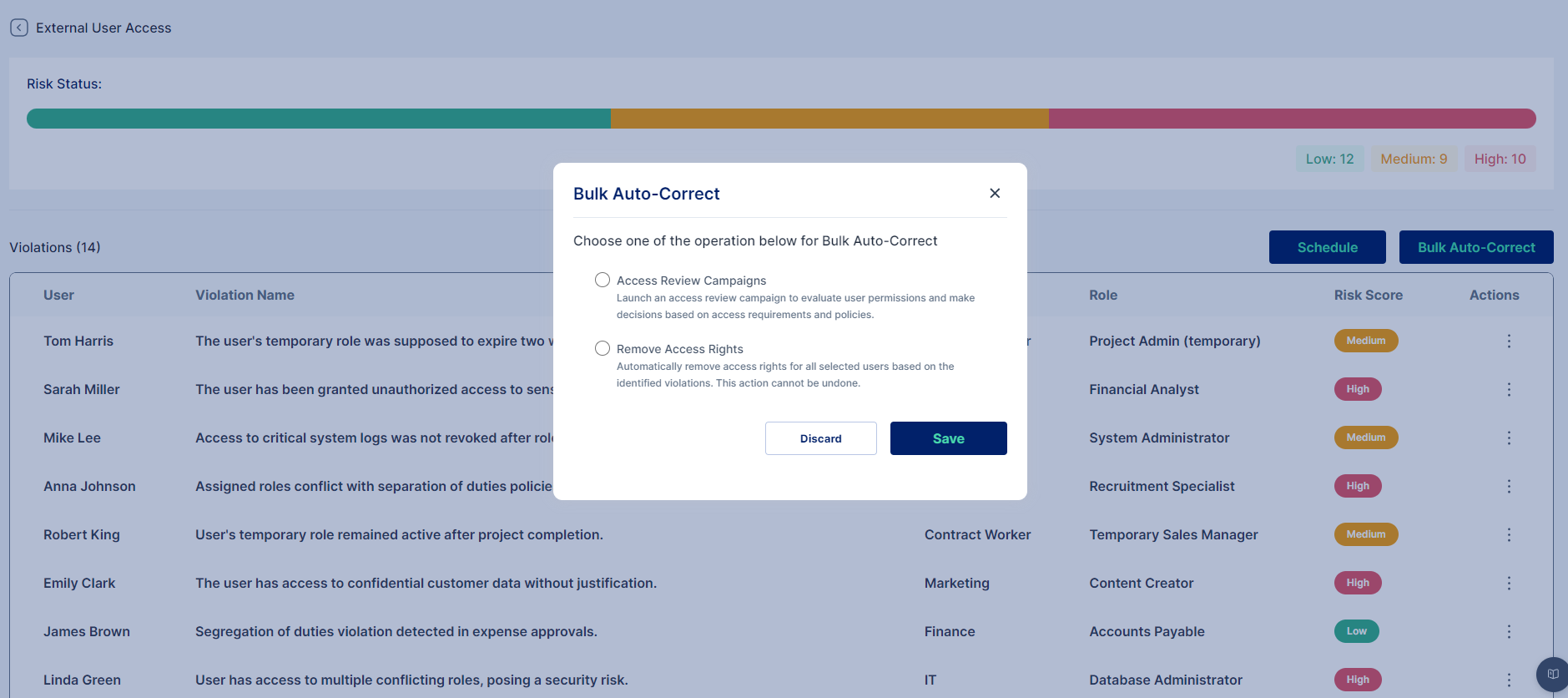
To ensure prompt remediation of critical violations, the IGA system offers an Auto-Correct feature. This feature automates the process of resolving violations by initiating corrective actions, such as access reviews or approval workflows.

How to Enable Auto-Correction

1. Navigate to the Auto-Correct Settings under the Policy Violations section.
2. Select the violations that require auto-correction.
3. Choose the appropriate remediation action (e.g., Access Certification Process, Approval Cycle).
4. Enable notifications for the administrator to receive updates on actions taken.
5. Ensure the Audit Log records all auto-correct actions for compliance and reporting purposes.

<figure><img src="/files/4dqMYOpRMoHYITJBmpv3" alt=""><figcaption><p>Artefact- Cymmetri Policy Violation Remediation View</p></figcaption></figure>


---

# Agent Instructions
This documentation is published with GitBook. GitBook is the documentation platform designed so that both humans and AI agents can read, navigate, and reason over technical content effectively. Learn more at gitbook.com.

## Querying This Documentation
If you need additional information that is not directly available in this page, you can query the documentation dynamically by asking a question.

Perform an HTTP GET request on the current page URL with the `ask` query parameter, and the optional `goal` query parameter:

```
GET https://help.cymmetri.io/governance/compliance-management/iga-policy-violations.md?ask=<question>&goal=<endgoal>
```

`ask` is the immediate question: it should be specific, self-contained, and written in natural language.
`goal` is optional and describes the broader end goal you are ultimately trying to accomplish on behalf of the user. GitBook uses it to tailor the answer towards what is most useful for that goal.

The response will contain a direct answer to the question and relevant excerpts and sources from the documentation.

Use this mechanism when the answer is not explicitly present in the current page, you need clarification or additional context, or you want to retrieve related documentation sections.